
Enhance Your Career With Available Preparation Guide for NetSec-Analyst Exam
Get Special Discount Offer of NetSec-Analyst Certification Exam Sample Questions and Answers
Palo Alto Networks NetSec-Analyst Exam Syllabus Topics:
| Topic | Details |
|---|---|
| Topic 1 |
|
| Topic 2 |
|
| Topic 3 |
|
| Topic 4 |
|
NEW QUESTION # 56
An administrator wants to create a NAT policy to allow multiple source IP addresses to be translated to the same public IP address. What is the most appropriate NAT policy to achieve this?
- A. Destination
- B. Dynamic IP and Port
- C. Static IP
- D. Dynamic IP
Answer: B
NEW QUESTION # 57
A multinational corporation has deployed Palo Alto Networks SD-WAN across its global offices. They have a critical VoIP application (App-ID: rtp-udp) that must always prioritize paths with less than 100ms latency and 0.5% jitter. If no single path meets both criteria, the system should attempt to aggregate bandwidth across multiple lower-quality paths if the combined latency and jitter for the aggregated flow can meet the requirements. If even aggregation is insufficient, the traffic should be dropped. Which SD-WAN policy and configuration elements are required to achieve this complex scenario?
- A. Palo Alto Networks SD-WAN does not natively support 'aggregation' of paths to meet a single SLA metric. You would need to configure primary/secondary paths based on individual link quality. If no single path meets the SLA, the traffic will fail over or be dropped based on PBF configuration.
- B. Configure an SD-WAN policy for VoIP, specifying a 'preferred path group' that includes all viable links. Set an 'SLA monitoring' profile with the latency and jitter thresholds. Enable 'link aggregation' on the device and configure a custom health check script that calculates combined path metrics across multiple links and dynamically adjusts route metrics to force traffic through aggregated paths if single links fail, otherwise drop.
- C. Utilize an SD-WAN policy for RTP-UDP with an SLA profile defining the 100ms latency and 0.5% jitter. Configure 'Dynamic Path Selection' with 'Multi-path' enabled. The policy should include a 'fail-action' of 'drop'. The system inherently calculates combined metrics for multi-path decision-making and drops if the SLA isn't met even with aggregation.
- D. Define an SLA profile for VoIP with 100ms latency and 0.5% jitter thresholds. Apply this SLA profile to the VoIP application within an SD-WAN policy. Configure the SD-WAN policy to use 'Path Monitoring' and 'Path Failover' to drop traffic if no single path meets the SL Bandwidth aggregation is not directly supported for SLA enforcement in this manner.
- E. Create an SD-WAN path quality profile for VoIP with the specified latency and jitter thresholds. Configure 'Path Aggregation' within the SD-WAN policy for the VoIP application, setting the aggregation mode to 'Performance-Based'. The policy should also specify 'Drop Traffic' as the action if the combined aggregated path quality fails to meet the profile thresholds.
Answer: C
Explanation:
Option D correctly addresses the nuanced requirements. Palo Alto Networks SD-WAN's 'Dynamic Path Selection' coupled with 'Multi-path' capability is designed to handle scenarios where a single path might not meet the SLA, but a combination of paths can, effectively utilizing bandwidth aggregation. By defining the stringent SLA profile and enabling multi-path, the SD-WAN engine intelligently distributes traffic across multiple links to meet the aggregated SLA, and if even that fails, the 'fail-action' of 'drop' ensures the traffic is not sent over inadequate paths. This is a key differentiator in advanced SD-WAN capabilities for real-time applications.
NEW QUESTION # 58
Which Security profile would you apply to identify infected hosts on the protected network uwall user database?
- A. Antivirus
- B. Vulnerability protection
- C. Anti-spyware
- D. URL filtering
Answer: C
NEW QUESTION # 59
You have been tasked to configure access to a new web server located in the DMZ Based on the diagram what configuration changes are required in the NGFW virtual router to route traffic from the 10 1 1 0/24 network to 192 168 1 0/24?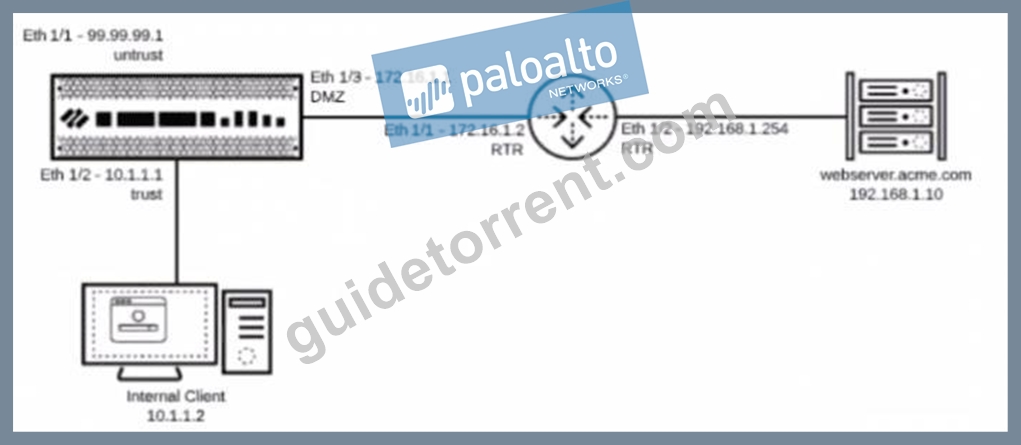
- A. Add a route with the destination of 192 168 1 0/24 using interface Eth 1/3 with a next-hop of 172.16.1.2
- B. Add a route with the destination of 192 168 1 0/24 using interface Eth 1/3 with a next-hop of 192.168
1.10 - C. Add a route with the destination of 192 168 1 0/24 using interface Eth 1/2 with a next-hop of 172.16.1.2
- D. Add a route with the destination of 192 168 1 0/24 using interface Eth 1/3 with a next-hop of
192.168.1.254
Answer: A
NEW QUESTION # 60
A Security Architect is designing a new firewall policy for a cloud environment where applications communicate using REST APIs over HTTP/S. They need to ensure that API traffic is strictly controlled and protected. Specifically, they want to: 1 . Allow only specific API methods (e.g., GET, POST, PUT) and block others (e.g., DELETE, TRACE) unless explicitly authorized. 2. Inspect API payloads for XML/JSON injection attacks and enforce schema validation. 3. Prevent file uploads larger than IOMB to API endpoints. 4. Log all successful API calls and block/log all denied calls. Which combination of Security Profiles and features should be used, and how are they applied to achieve this?
- A. Leverage a custom URL Category for 'allowed-api-methods' and 'blocked-api-methods' within a URL Filtering profile. Use a Data Filtering profile to enforce schema validation and detect injection, and a separate File Blocking profile for upload size. Apply all of these within a Security Profile Group to the API policy rule. Ensure session logging is enabled on the rule.
- B. Define a Security Policy Rule that explicitly allows HTTP/S traffic to API endpoints. Within the 'Application' section of this rule, use 'http-method' application filters (e.g., allow 'http-get', 'http-post'). Apply a Vulnerability Protection profile with signatures for injection attacks. Use a File Blocking profile for upload size limits. For payload inspection and schema validation, configure a Data Filtering profile with custom regex patterns for the expected API structure. Attach all to a Security Profile Group on the API rule.
- C. Create a custom application for API traffic. Define a custom signature for HTTP methods within the Threat Prevention profile (Vulnerability Protection) to block specific methods. Use a Vulnerability Protection profile with signatures for XML/JSON injection and a File Blocking profile for upload size. Data Filtering for schema validation is not natively supported for XML/JSON. Ensure logging on the security rule.
- D. Configure an HTTP Header Insertion Profile to enforce allowed methods. Use a Vulnerability Protection profile with specific attack signatures and a custom Data Pattern in a Data Filtering profile for schema validation of API payloads (e.g., regex for required fields). Utilize a File Blocking profile for size limits. Apply these through a Security Profile Group to the API security policy rule. Create a custom URL category for each API endpoint to apply granular controls.
- E. Create a URL Filtering profile to block unwanted HTTP methods. Use a Vulnerability Protection profile to detect XML/JSON injection. Configure a File Blocking profile to limit upload sizes. Apply these to a Security Profile Group on the API security policy rule. Logging is default.
Answer: B
Explanation:
Option E provides the most accurate and integrated solution for API security on a Palo Alto Networks firewall. HTTP Method Control ('http-method' application filters): The most direct and efficient way to allow/block specific HTTP methods is by using App-ID's built-in 'http- method' application filters directly in the security policy rule. Vulnerability Protection (Injection Attacks): Standard for detecting and preventing XML/JSON injection attacks through signatures. File Blocking (Upload Size): Directly handles the requirement to limit file upload sizes. Data Filtering (Schema Validation/Payload Inspection): While not full WAF-style schema validation, Data Filtering with custom regex patterns can effectively inspect API payloads for specific data formats or the presence/absence of required fields, acting as a form of light schema enforcement or anomaly detection. Security Profile Group: Consolidating these profiles into a group is best practice for manageability and consistent application. Option A's URL Filtering for methods is less precise than App-ID. Option B suggests Data Filtering for schema validation (which is possible with regex, but less direct than E's approach), but URL filtering for methods is less precise. Option C is incorrect about Data Filtering's capabilities. Option D uses HTTP Header Insertion, which is not primarily for blocking methods or payload inspection, and custom URL categories for endpoints don't directly control methods or payload content as effectively as E's approach
NEW QUESTION # 61
An organization wants to create a custom URL category for a list of highly sensitive internal web applications that should only be accessible from specific internal subnets. However, these applications are accessed via FQDNs that share a common, publicly resolvable root domain (e.g., 'appl.corp.example.com', 'app2.corp.example.com' , 'finance.corp.example.com'). The challenge is that .corp.example.com' is also used by many other public-facing services, and blocking the entire 'corp.example.com' domain would cause significant business disruption. The security team needs to precisely define the custom URL category to include only appl.corp.example.com' , 'app2.corp.example.com' , and 'finance.corp.example.com' , without affecting other subdomains, and then apply a strict access policy. Which configuration approach for the custom URL category is most precise and least prone to false positives, assuming other subdomains like 'public.corp.example.com' or 'dev.corp.example.com' exist and should not be included?
- A.

- B.

- C.

- D.

- E.

Answer: D
Explanation:
This scenario emphasizes precision in URL category definition to avoid over-blocking. Let's analyze the options: A. Custom URL Category Type: URL, Entries: 'appl.corp.example.com', 'app2.corp.example.com', 'finance.corp.example.com' (Correct) Type: URL : This type is used for exact string matches of full URLs or FQDNs. When you provide just the FQDNs (e.g., 'appl.corp.example.com') as entries, the firewall will match 'http://appl.corp.example.com', Shttps://appl.corp.example.com', and any path or query string following it (e.g., 'https://appl.corp.example.com/login'). This provides the most precise match for the explicitly listed sensitive applications without affecting other subdomains under 'corp.example.com' or the root domain itself. This is the simplest and most accurate method for a fixed list of FQDNs. B. Custom URL Category Type: Wildcard, Entries: 'appl.corp.example.com', 'app2.corp.example.com', 'finance.corp.example.com' Type: Wildcard : While Wildcard type exists, providing full FQDNs without any actual wildcards C ' ) makes it behave similarly to the 'URL' type in this specific case, but 'URL' is the more explicit and intended type for full FQDNs or URLs. If the entries were .corp.example.com', then it would be a wildcard, but that would over-block. C. Custom URL Category Type: Regex, Pattern: 'Ahttps?://(appl lapp21finance)\.corp\.example\.com(/. )?$ Type: Regex : This regex is technically correct and precise. However, for a fixed and small list of FQDNs, using the 'URL' type (Option A) is simpler, more efficient, and less prone to regex-related errors for administrators who might not be regex experts. Palo Alto Networks documentation often recommends the simplest effective method. If the list was dynamic or had complex patterns, Regex would be preferred, but not here. D. Custom URL Category Type: Domain, Entries: 'appl .corp.example.com', 'app2.corp.example.com', 'finance.corp.example.com' Type: Domain : This type matches the entire domain and all its subdomains. For instance, if you add 'corp.example.com' , it would match 'appl .corp.example.com', 'public.corp.example.com', 'dev.corp.example.com', and even 'www.corp.example.com'. Adding specific FQDNs like appl .corp.example.com' as 'Domain' type entries typically means it will match 'appl.corp.example.com' AND any sub-subdomains (e.g., 'test.appl.corp.example.com'), which is not what's intended for precise blocking of specific FQDNs. E. Custom URL Category Type: Regex, Pattern: ' . (appl Type: Regex : This regex uses . at the beginning and end, making it overly broad. It would match 'badappl.corp.example.com' or 'test-appl.corp.example.com', leading to false positives. It's not anchored to the beginning of the hostname or specific subdomains, which can be problematic.
NEW QUESTION # 62
A network architect is designing a new security posture for a hybrid cloud environment. They have Palo Alto Networks firewalls deployed on-premise and in AWS, Azure, and GCP. The requirement is to have a single pane of glass for security policy management, threat intelligence updates, and centralized logging that can scale with dynamic cloud workloads. Which combination of Palo Alto Networks products and services best fulfills these requirements?
- A. Individual firewall UIs for management, Splunk for logging, and manual threat intelligence updates.
- B. Cloud-managed Panorama, Strata Logging Service, and Advanced Threat Prevention (ATP) subscriptions.
- C. VM-Series firewalls in each cloud, managed individually, forwarding logs to a central syslog server.
- D. Palo Alto Networks GlobaIProtect Cloud Service (GPCS) for all traffic, with no firewalls.
- E. Panorama (on-premise), local log collectors, and external threat feeds.
Answer: B
Explanation:
Cloud-managed Panorama provides the centralized policy management across diverse cloud and on-premise environments. Strata Logging Service offers scalable, cloud-native logging for all Palo Alto Networks devices, consolidating logs from various sources into a single data lake. Advanced Threat Prevention (ATP) subscriptions (e.g., WildFire, Threat Prevention, URL Filtering) deliver up-to-date threat intelligence and security capabilities. This combination provides a cohesive, scalable, and centrally managed security solution for a hybrid cloud.
NEW QUESTION # 63
A financial institution is deploying IoT devices for environmental monitoring in its data centers. These devices use HTTPS for communication with a cloud-based management platform. Due to compliance requirements, all data leaving the data center must be inspected for sensitive information (e.g., financial data leakage, PII). Additionally, the devices must be authenticated using client certificates. Describe the comprehensive Palo Alto Networks IoT security profile configuration that ensures both deep content inspection and device authentication for these IoT devices.
- A. Implement 'URL Filtering' to allow only the cloud management platform's domain. Create a 'Data Filtering' profile to inspect for sensitive data. Configure a 'Security Policy' allowing HTTPS to the cloud platform, applying both URL Filtering and Data Filtering. Rely on pre-shared keys for device authentication.
- B. Deploy a 'Web Proxy' in front of the NGFW for HTTPS inspection. Configure the NGFW to use 'User-ID' for device authentication and integrate it with an external AAA server. Use 'File Blocking' to prevent data leakage.
- C. Apply a 'Threat Prevention' profile to block all suspicious activity. Create a 'Tunnel Inspection' profile for all IoT traffic. Configure a 'Security Policy' with 'Source: IoT Zone', 'Destination: Cloud IP', 'Application: any', and 'Action: Allow'.
- D. Create an 'IoT Security Profile' with 'Device-ID' enabled. Configure a 'Security Policy' rule from the IoT zone to the Internet, specifying 'Application: ssl', 'Service: application-default', and enable 'SSL Decryption' with a forward trust certificate. Additionally, configure 'Client Certificate Authentication' within the 'Authentication Profile' linked to the security rule.
- E. Configure a 'NAT Policy' to translate IoT device IPs. Create a 'Custom URL Category' for the cloud platform. Enable 'DDoS Protection' for the IoT zone. Device authentication will be handled at the cloud platform level.
Answer: D
Explanation:
Option A is the most comprehensive and correct approach for both deep content inspection and device authentication using Palo Alto Networks NGFWs.
1. 'SSL Decryption' with a forward trust certificate is essential for inspecting HTTPS traffic payload for sensitive data.
2. 'Client Certificate Authentication' within an 'Authentication Profile' linked to the security rule allows the firewall to validate the IoT device's certificate presented during the SSL handshake, fulfilling the device authentication requirement.
3. 'Device-ID' is crucial for classifying and grouping these IoT devices for policy enforcement. Option B lacks client certificate authentication and deep content inspection. Option C is too vague and misuses 'Tunnel Inspection'. Option D misses the core requirements. Option E introduces a web proxy, which might be an alternative but isn't the direct NGFW capability for client certificate authentication and 'User-ID' is typically for human users, not direct device authentication via certificates at the network layer.
NEW QUESTION # 64
Based on the show security policy rule would match all FTP traffic from the inside zone to the outside zone?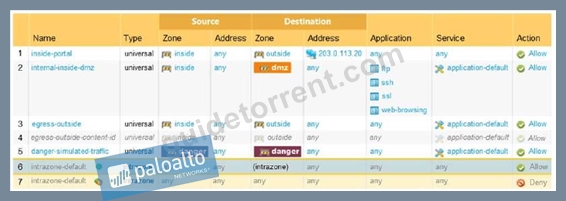
- A. engress outside
- B. intercone-default
- C. inside-portal
- D. internal-inside-dmz
Answer: A
NEW QUESTION # 65
An organization uses several different web-conferencing tools (Zoom, Microsoft Teams, WebEx).
The analyst wants to create a single security rule to allow all these tools without listing each App- ID individually. What should the analyst create?
- A. Application Group
- B. Service Group
- C. Application Filter
- D. Custom App-ID
Answer: A
Explanation:
To manage a specific, known set of applications, an Application Group is the most appropriate object. The analyst manually adds the specific App-IDs (Zoom, Teams, etc.) to the group and then uses that group object in the "Application" column of a security rule.
This is distinct from an Application Filter (Option A), which dynamically groups applications based on shared characteristics like "Category: collaboration". While a filter is more automated, an Application Group provides the analyst with explicit control over which "sanctioned" apps are allowed. Using groups simplifies the rulebase, making it easier to read and audit. If the company decides to switch conferencing providers, the analyst only needs to update the single group object, and the change will automatically apply to all security rules referencing that group.
NEW QUESTION # 66
An administrator would like to create a URL Filtering log entry when users browse to any gambling website. What combination of Security policy and Security profile actions is correct?
- A. Security policy = deny. Gambling category in URL profile = block
- B. Security policy = allow. Gambling category in URL profile = allow
- C. Security policy = allow, Gambling category in URL profile = alert
- D. Security policy = drop, Gambling category in URL profile = allow
Answer: C
NEW QUESTION # 67
A large e-commerce platform is experiencing intermittent slowdowns during peak shopping hours. Analysis shows a surge in new TCP connections from various source IPs, many of which appear to be legitimate but are overwhelming the server's connection table. The security team suspects a sophisticated SYN flood attack that mimics legitimate traffic. Which of the following DoS protection profile settings, when applied to the relevant security rule, would be most effective in mitigating this specific type of attack without significantly impacting legitimate user experience, and why?
- A. Configure 'IP Address Block' for sources exceeding a 'Connection Rate' of 1000 connections/second for 60 seconds to immediately blackhole attacking IPs.
- B. Utilize 'SYN Flood Protection' with 'Action: Protect' and a 'Max Concurrent Sessions' threshold set significantly lower than the server's capacity, combined with 'Client Hello Timeout' to quickly identify incomplete handshakes.
- C. Activate 'SYN Cookies' with a high 'Activation Rate' and a low 'Alarm Rate' to quickly drop malicious SYN requests while allowing legitimate ones to proceed.
- D. Implement 'Path Monitoring' with 'Action: Block' to identify and block suspicious paths, ensuring only trusted routes are used for traffic.
- E. Enable 'Random Early Drop (RED)' on the 'TCP Flood' DoS protection profile with a very low 'Low Threshold' to aggressively drop connections before the server is overwhelmed.
Answer: C
Explanation:
The scenario describes a sophisticated SYN flood where connections appear legitimate but overwhelm the connection table. SYN Cookies are specifically designed to mitigate SYN floods by sending a SYN-ACK with a specially crafted sequence number (the cookie) and only completing the handshake if the client returns the correct ACK. This offloads the connection state from the server until the handshake is complete, effectively protecting against SYN floods without impacting legitimate users. Option B (RED) is too aggressive for legitimate-looking traffic and might cause collateral damage. Option C (IP Address Block) is reactive and might block legitimate users if the attack is distributed. Option D (Path Monitoring) is irrelevant for this type of DoS attack. Option E (Max Concurrent Sessions and Client Hello Timeout) might help, but SYN Cookies are a more targeted and efficient defense against SYN floods specifically.
NEW QUESTION # 68
A Palo Alto Networks firewall is suffering from high CPU utilization due to an excessive volume of logs being processed and forwarded. An investigation reveals that a Log Forwarding Profile is forwarding all log types, including debugging logs, to a remote syslog server. To optimize performance without completely disabling logging, which of the following is the most effective adjustment to the existing Log Forwarding Profile?
- A. Increase the log buffer size on the firewall to temporarily store more logs, reducing immediate forwarding load.
- B. Implement a custom filter within the Log Forwarding Profile to exclude verbose log types like 'debug' or 'pkt-diag' using expressions such as

- C. Configure a Log Rate Limit on the firewall to cap the total logs per second being forwarded.
- D. Change the log forwarding protocol from UDP to TCP for reliability, as dropped UDP packets cause retransmissions and higher CPU.
- E. Reduce the number of Security Policies that utilize this Log Forwarding Profile.
Answer: B
Explanation:
Option C directly addresses the root cause: excessive logging of unnecessary log types. By excluding verbose log types like 'debug' or 'pkt-diag' directly within the Log Forwarding Profile's filter, the firewall will stop processing and forwarding these specific logs, significantly reducing the log volume and associated CPU load. Option A (TCP vs UDP) affects reliability but not necessarily volume. Option B (buffer size) only defers the problem. Option D (reducing policies) would prevent necessary logging. Option E (Log Rate Limit) is a throttling mechanism that might drop logs if the rate is exceeded, which isn't ideal for compliance, and doesn't solve the issue of generating too many logs to begin with.
NEW QUESTION # 69
A company wants to ensure that all internal users are prevented from uploading sensitive documents to a specific personal cloud storage site. Which Security profile is specifically designed to inspect the content of file transfers for specific data patterns?
- A. Vulnerability Protection Profile
- B. Data Filtering Profile
- C. WildFire Analysis Profile
- D. File Blocking Profile
Answer: B
Explanation:
While a File Blocking Profile (Option A) can block files based on their type (e.g., preventing any .docx upload), it does not look at the information within the file. The Data Filtering Profile is the tool designed for Data Loss Prevention (DLP).
An analyst uses Data Filtering to scan file uploads and downloads for specific sensitive patterns, such as credit card numbers, Social Security numbers, or custom regex patterns (like internal project IDs). By attaching this profile to a security rule that allows access to the cloud storage application, the firewall can permit the use of the app while specifically blocking any session that contains unauthorized data. This provides a granular layer of security that protects intellectual property and ensures regulatory compliance without completely disabling the business applications users need to perform their jobs.
NEW QUESTION # 70
A Security Operations Center (SOC) analyst observes that despite having a comprehensive decryption policy, some critical threat signatures related to encrypted traffic are not being matched. Specifically, known C2 (Command and Control) communication patterns over TLS are bypassing detection. The firewall logs show these sessions are being 'allowed' and 'decrypted', but no threat logs are generated for the expected signatures. What is the most probable misconfiguration that leads to this situation, assuming the decryption profile is correctly applied and the threat signatures are active?
- A. The applications used for C2 communication are implicitly added to the 'SSL Decryption Exclusion' list by a dynamic update.
- B. The 'Decryption Rule' is configured with an action of 'No Decryption' for the relevant traffic.
- C. The decryption profile's 'Block Session on Untrusted Certificate' option is unchecked, allowing untrusted C2 certificates to proceed.
- D. The firewall's Forward Trust certificate is expired, causing decryption to silently fail and fall back to plain TLS.
- E. The security policy rule applying the decryption profile is missing a 'Vulnerability Protection' or 'Anti-Spyware' profile.
Answer: E
Explanation:
This is a subtle but critical point about the execution order and dependencies. Decryption simply makes the traffic visible to the firewall. For threat signatures (like C2 patterns) to be matched, the decrypted traffic must then be inspected by the relevant Security Profiles. If the security policy rule applying the decryption profile does not also include a Vulnerability Protection profile (for exploits) or an Anti-Spyware profile (for C2 and malware), then even if the traffic is decrypted, no inspection will occur against those specific threat signatures, and thus no threat logs will be generated. The question explicitly states logs show 'decrypted' but no threat logs, which points directly to a missing security profile after decryption.
NEW QUESTION # 71
An administrator would like to block access to a web server, while also preserving resources and minimizing half-open sockets. What are two security policy actions the administrator can select? (Choose two.)
- A. Drop
- B. Reset server
- C. Deny
- D. Reset both
Answer: A,B
NEW QUESTION # 72
An analyst needs to create a security rule to allow access to a specific web application that identifies itself as "web-browsing" but uses a custom, non-standard port of TCP 9000. Which configuration ensures the App-ID engine can still inspect this traffic?
- A. Change the Service to "application-default."
- B. Change the application to "any" and the service to TCP 9000.
- C. Create a custom Service object for TCP 9000 and use it in the rule.
- D. Use an Application Override rule for port 9000.
Answer: C
Explanation:
In a Palo Alto Networks environment, the Service column in a security rule defines the destination port used for the initial session establishment. If an application like web-browsing (which typically uses TCP 80 or 443) is running on a non-standard port like TCP 9000, the analyst must create a custom Service object for that port.
Using this custom service object in the security rule allows the session to be established on port
9000 while maintaining full App-ID inspection. This is critical because it allows the firewall to verify that the traffic is actually web-browsing and not a threat masquerading as a web service. Option A is incorrect because "application-default" would restrict the traffic to standard ports only. Option C (Application Override) is incorrect because it would disable Layer 7 inspection entirely, which is a significant security risk. By using a custom service with the correct App-ID, the analyst ensures that security remains granular and effective without disrupting non-standard business applications.
NEW QUESTION # 73
Which path is used to save and load a configuration with a Palo Alto Networks firewall?
- A. Device>Setup>Operations
- B. Device>Setup>Interfaces
- C. Device>Setup>Management
- D. Device>Setup>Services
Answer: A
NEW QUESTION # 74
An organization is migrating services to a hybrid cloud environment and needs to create custom Zone Protection profiles to mitigate specific Layer 2 and Layer 3 attacks targeting their new cloud-connected interfaces. They have identified the following attack vectors:
1 . ARP Spoofing attempts originating from within the trusted internal network segment connected to the firewall's 'trust-zone' interface.
2. IP Spoofing (source IP outside allowed ranges) on their external-facing 'untrust-zone' interface.
3. Fragmented Packet attacks targeting the 'dmz-zone' interface, where a critical web server resides. Which combination of Zone Protection Profiles and their respective settings would address these requirements most effectively and precisely?
- A.

- B.

- C.

- D.

- E.

Answer: E
Explanation:
This question tests the practical application of Zone Protection Profiles for various attack types. Let's break down each requirement and the corresponding Zone Protection feature: 1. ARP Spoofing attempts from 'trust-zone: Feature: 'ARP Protection" within the Zone Protection Profile. This feature monitors ARP traffic and detects anomalies like Gratuitous ARP inconsistencies or ARP request/reply mismatches. It's crucial for internal network segments. Dynamic learning helps build a baseline, and static entries can be added for critical devices. Why D is good: 'ARP Protection' (dynamic learning, and Static ARP Entries if critical) directly addresses this. 2. IP Spoofing (source IP outside allowed ranges) on 'untrust-zone': Feature: "IP Spoofing Protection'. This feature checks if the source IP address of incoming packets is valid for the ingress interface/zone. For external-facing interfaces, it ensures that traffic purporting to be from the internal network (or any network not expected on the untrust-zone) is blocked. Why D is good: 'IP Spoofing Protection' with 'Action: Block' and emphasizing correct recognition of valid sources (i.e., external IPs) is accurate for the untrust-zone. 3. Fragmented Packet attacks targeting 'dmz-zone': Feature: Packet Based Attack Protection' and specifically 'Fragmented PacketS. This part of Zone Protection aims to prevent attacks that exploit weaknesses in fragmented IP packets (e.g., overlapping fragments, tiny fragments). These attacks can bypass security controls or cause resource exhaustion. Why D is good: 'Packet Based Attack Protections (specifically Fragmented PacketS with 'Action: Block') directly addresses this. Evaluation of Options: A: Correctly identifies the features. It's a strong contender. The wording on IP Spoofing protection in D is slightly more robust by mentioning the need to ensure valid sources are understood. B: Incorrect. SIP Spoofing Protection' on 'trust-zone' is usually not the primary concern for ARP spoofing (which is L2). 'ARP Protection' on 'untrust-zone' is misplaced as ARP is a local LAN protocol. SYN Flood' is for DoS, not fragmented packets. C: 'ARP Protection' with 'Static ARP Entry Verification' is too restrictive and might cause issues if dynamic ARP entries are common. ' IP Spoofing Protection' with Source IP 'Any' is too generic and might not distinguish valid external sources. SIP Option Drop' is related but not the primary solution for fragmented packet attacks . D (Correct): This option provides the most precise and complete set of configurations. It clearly maps each attack vector to the correct Zone Protection feature and highlights relevant considerations (dynamic ARP learning, valid source recognition for IP spoofing). It specifically targets Fragmented Packets for the DMZ. E: Only addresses various types of Flood Protection (DoS attacks), which are not what the problem describes for ARP spoofing, IP spoofing, or fragmented packets.
NEW QUESTION # 75
An organization needs to implement a security rule that allows users to access "Facebook" but prevents them from using "Facebook-Chat." What is the best way to achieve this?
- A. Use an Application Override rule for Facebook traffic.
- B. Create a security rule allowing the "Facebook-base" App-ID and another rule blocking the "Facebook- chat" App-ID.
- C. Block the specific IP addresses used by Facebook Chat.
- D. Create a URL Filtering profile to block the chat URL.
Answer: B
Explanation:
Comprehensive and Detailed 150 to 250 words of Explanation From Palo Alto Networks Network Security Analyst Knowledge:
The power of App-ID lies in its ability to distinguish between different functions within the same web service. Palo Alto Networks provides specific App-IDs for various sub-functions of popular sites.
To achieve the requirement, the analyst should create two security rules (or one rule with a specific exclusion). The first rule, placed higher in the policy, would block the Facebook-chat App-ID. The second rule, placed below it, would allow the Facebook-base App-ID. Because the firewall evaluates rules from the top down, any attempt to use the chat function will hit the block rule first. This provides much higher security and granularity than URL Filtering (Option A), which might struggle to differentiate between the different elements of a dynamic, HTTPS-based site like Facebook. Using App-ID for this purpose ensures that the business can allow the useful parts of social media while mitigating the risks associated with unauthorized file transfers or interactive chat functions.
NEW QUESTION # 76
What Policy Optimizer policy view differ from the Security policy do?
- A. It indicates rules with App-ID that are not configured as port-based.
- B. It shows rules that are missing Security profile configurations.
- C. It indicates that a broader rule matching the criteria is configured above a more specific rule.
- D. It shows rules with the same Source Zones and Destination Zones.
Answer: A
Explanation:
Policy Optimizer policy view differs from the Security policy view in several ways. One of them is that it indicates rules with App-ID that are not configured as port-based. These are rules that have the application set to "any" instead of a specific application or group of applications. These rules are overly permissive and can introduce security gaps, as they allow any application traffic on the specified ports. Policy Optimizer helps you convert these rules to application-based rules that follow the principle of least privilege access12. You can use Policy Optimizer to discover and convert port-based rules to application-based rules, and also to remove unused applications, eliminate unused rules, and discover new applications that match your policy criteria3. Reference:
Policy Optimizer Best Practices - Palo Alto Networks
Manage: Policy Optimizer - Palo Alto Networks | TechDocs
Why use Security Policy Optimizer and what are the benefits?
NEW QUESTION # 77
A Palo Alto Networks firewall is configured with IPSec VPN tunnels to multiple branch offices. Users in a specific branch office are reporting intermittent connectivity issues to resources in the main data center. 'show vpn flow' on the main data center firewall shows the VPN tunnel state as 'Up', but the 'Rx Bytes' and 'Tx Bytes' are not incrementing for traffic from the affected branch. 'show log traffic direction equal reverse' on the main firewall also shows no matching traffic for the branch network's return path. What is the MOST complex and difficult-to-diagnose underlying network issue that could cause this scenario?
- A. A duplicate IP address conflict exists on the branch office network, causing routing instability.
- B. The pre-shared key (PSK) on one end of the VPN tunnel has been changed, leading to decryption failures.
- C. The branch office firewall's local proxy ID or remote proxy ID configuration is incorrect for the main data center's subnets.
- D. An upstream ISP routing change or BGP flap on the branch office's internet connection is intermittently black-holing traffic destined for the main data center's public IP address.
- E. The 'security-zone' configuration on the tunnel interface on either end of the VPN has been changed or removed, breaking policy enforcement.
Answer: D
Explanation:
The most difficult-to-diagnose issue among the choices, given the symptoms, is an intermittent upstream routing problem (D). If the VPN tunnel itself shows 'Up' and 'Rx/Tx Bytes' are not incrementing for traffic , it means traffic isn't reaching the tunnel or isn't successfully traversing it. Options A, C, and E would typically cause the VPN tunnel itself to go down or prevent any traffic. Option B is an internal issue for the branch, but wouldn't manifest as no Rx/Tx bytes on the main firewall's VPN tunnel interface unless it completely prevented all branch traffic from reaching the internet. Option D, an intermittent ISP routing change, could cause traffic to the main data center's public IP (the VPN peer) to be dropped before it even reaches the branch firewall, or return traffic from the main data center to the branch firewall to be lost. This would explain 'Up' tunnel but no traffic, and no matching reverse traffic logs, as the packets aren't successfully traversing the public internet path to initiate or maintain the encrypted flow within the tunnel. Diagnosing this often requires collaboration with ISPs and traceroutes from multiple points.
NEW QUESTION # 78
An administrator is troubleshooting an issue with traffic that matches the intrazone-default rule, which is set to default configuration.
What should the administrator do?
- A. review the System Log
- B. tune your Traffic Log filter to include the dates
- C. change the logging action on the rule
- D. refresh the Traffic Log
Answer: C
NEW QUESTION # 79
An organization is deploying a new application that uses non-standard ports for critical services and requires strict compliance logging of all access attempts, regardless of success or failure. The security team needs to ensure these specific sessions are always logged and accessible in Strata Logging Service with high fidelity. What configuration elements on the Palo Alto Networks firewall and within Strata Logging Service are essential to meet this requirement, and how can log volume be managed efficiently for these specific services without impacting performance?
- A. On firewall: Create a security policy rule for the application traffic, set the 'Action' to 'allow', and ensure 'Log at Session Start' and 'Log at Session End' are enabled. For compliance, also create a 'deny' rule before the 'allow' rule with 'Log at Session Start' enabled for the same traffic to capture failed attempts. Use a 'Custom Log Forwarding Profile' attached to these rules, configured to send relevant log types (e.g., traffic, threat, url) to Strata Logging Service. Strata Logging Service automatically handles volume.
- B. On firewall: Enable packet capture for the specific ports and export PCAP files to Strata Logging Service for analysis. In Strata Logging Service: Utilize the PCAP viewer to analyze sessions.
- C. On firewall: Create a security policy rule allowing the application traffic and set the 'Action' to 'allow' with 'Log at Session End' enabled. In Strata Logging Service: Configure a dedicated log profile for the application to push logs to a separate data bucket.
- D. On firewall: Configure mirroring of all traffic to a dedicated sensor that forwards logs directly to Strata Logging Service. In Strata Logging Service: Define a custom dashboard for the mirrored logs.
- E. On firewall: Use an 'Intra-Zone' policy with 'Log at Session End' and configure a syslog profile to send logs to a local syslog server, not Strata Logging Service, for better control over log volume.
Answer: A
Explanation:
For high-fidelity logging of all access attempts (success or failure) and efficient log management for specific services: 1. On the firewall: Enabling 'Log at Session Start' and 'Log at Session End' on both 'allow' and a preceding 'deny' rule (for the same traffic) ensures both successful and failed attempts are logged. 2. Custom Log Forwarding Profiles are crucial as they allow granular control over which log types are sent and to which log receivers (Strata Logging Service). This prevents unnecessary logs from being sent, managing volume. 3. Strata Logging Service is designed to handle large log volumes and automatically scales; it doesn't require separate data buckets for individual applications in the way suggested by Option A, but rather provides powerful query capabilities to filter data. Packet capture (D) is too resource-intensive for continuous compliance logging. Mirroring (C) is a different mechanism for full packet visibility, not direct log forwarding.
NEW QUESTION # 80
A Palo Alto Networks firewall is configured with a complex data filtering policy to prevent PII exfiltration. A Data Pattern named 'SSN_Pattern' (using a pre-defined regex for Social Security Numbers) is configured with a 'Threshold' of 3 occurrences within a single session to trigger an alert, and an 'Action' of 'Alert'. This 'SSN_Pattern' is part of a Data Filtering Profile named 'PII_Monitoring', which is applied to an 'Allow' security policy rule for all outbound traffic from the 'Internal_Users' zone. During testing, a user from 'Internal_Users' attempts to upload a document containing two valid SSN patterns to an external cloud storage service via HTTPS. Simultaneously, another user from the 'Internal_Users' zone attempts to send an email with four valid SSN patterns through an external SMTP server. Assuming SSL decryption is correctly configured for both traffic flows and working as expected: Which of the following statements accurately describes the expected behavior of the firewall?
- A. Both the cloud storage upload and the email will be allowed, and no alerts will be generated.
- B. Both the cloud storage upload and the email will be blocked due to PII detection.
- C. The cloud storage upload will be blocked, and the email will be allowed with an alert.
- D. The cloud storage upload will be allowed with no alert, and the email will be allowed with an alert.
- E. The cloud storage upload will be allowed with an alert, and the email will be blocked.
Answer: D
Explanation:
This question tests the understanding of Data Pattern thresholds, actions, and the 'per-session' context for Data Filtering. Key Configuration Details: Data Pattern: 'SSN_Pattern' Threshold: 3 occurrences within a single session . Action for 'SSN_Pattern': 'Alert'. This means even if the threshold is met, the traffic itself is allowed , but an alert is generated. Data Filtering Profile: 'PII_Monitoring' contains 'SSN_Pattern'. Security Policy: 'PII_Monitoring' is applied to an 'Allow' rule. Scenario Analysis: 1. Cloud Storage Upload (User 1): Number of SSN patterns: 2 Threshold for alert: 3 Result: Since 2 is less than the threshold of 3, the action (Alert) is not triggered. The traffic is allowed because the security policy is an 'Allow' rule. Outcome: Allowed, No Alert. 2. Email Send (User 2): Number of SSN patterns: 4 Threshold for alert: 3 Result: Since 4 meets or exceeds the threshold of 3, the action (Alert) is triggered. The traffic is still allowed because the action is 'Alert', not 'Block'. An alert log entry will be generated. Outcome: Allowed, With Alert. Combining these, the cloud storage upload is allowed with no alert, and the email is allowed with an alert. Therefore, Option C is the correct answer.
NEW QUESTION # 81
......
Updated NetSec-Analyst Dumps Questions Are Available For Passing Palo Alto Networks Exam: https://testking.guidetorrent.com/NetSec-Analyst-dumps-questions.html